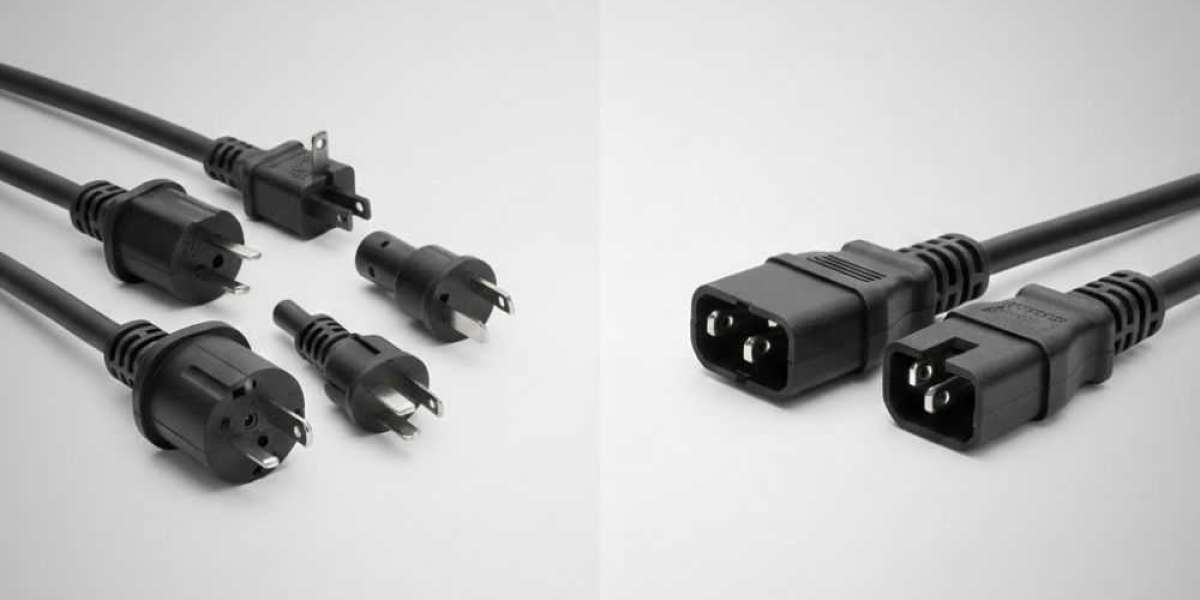

If you've ever looked at the back of your computer or server, you've probably seen those black power connectors. You might have wondered what they're called and why they look different from regular plugs. Today, we're going to talk about C13 and C14 power cords and clear up any confusion.
Understanding the Basics
Let's start simple. C13 and C14 are part of the IEC 60320 standard. This is just a fancy way of saying they follow international rules for power connectors. You'll find these connectors on almost every piece of computer equipment in offices and data centers around the world.
Here's the most important thing to remember: C13 is the socket (female), and C14 is the plug (male). They fit together like a lock and key. You can't use one without the other.
What is a C13 Connector?
The C13 connector is the receiving end of the power connection. It's the inlet that you plug your power cord into. Think of it as the socket on your equipment.
You'll find C13 inlets on the back of:
- Desktop computers
- Monitors
- Servers
- Network switches
- Printers
- Many other office devices
The C13 has three holes arranged in a specific pattern. It can handle up to 10 amps of current at 250 volts. This makes it perfect for most standard office equipment.
What is a C14 Connector?
The C14 connector is the plug that goes into the C13 socket. It has three prongs that match up with the holes in the C13.
C14 connectors are typically found on:
- Power supply units
- UPS (Uninterruptible Power Supply) outputs
- PDUs (Power Distribution Units)
- Extension cords for equipment
When you buy a replacement power cord for your computer, you're usually getting a cable that has a C14 on one end and a standard wall plug on the other end.
The Main Differences
Let me break down the key differences in a way that makes sense:
Physical Design: The C13 is recessed with holes (female), while the C14 sticks out with prongs (male). They're designed to fit together perfectly.
Purpose: C13 receives power, and C14 delivers power. The C13 sits on your equipment waiting for power. The C14 brings that power from another source.
Location: You'll find C13 inlets built into devices. C14 plugs come on cables and power supplies.
Safety: The C13 design keeps the live connections protected inside the socket. The C14 only becomes live when plugged into a power source.
How They Work Together
Here's a typical setup in an office: Your computer has a C13 inlet on the back. You take a power cord with a C14 plug and connect it to your computer. The other end of that cord has a regular wall plug that goes into your outlet.
In data centers, things get more interesting. Servers have C13 inlets. But instead of plugging directly into wall outlets, they connect to PDUs. These PDUs have multiple C14 outlets. This setup gives you better power management and backup options.
Power Ratings and Safety
Both C13 and C14 connectors can handle up to 10 amps at 250 volts. This equals about 2,500 watts of power. That's more than enough for typical computer equipment.
The connectors have a built-in safety feature. They're keyed, which means you can only plug them in one way. You can't accidentally reverse the connection or force them together incorrectly.
The design also prevents accidental disconnection. Once plugged in, they stay connected unless you intentionally pull them apart.
Other Power Connector Options
While we're talking about power connectors, it's worth mentioning that C13 and C14 aren't your only options. Different equipment needs different power solutions.
For example, if you need a locking power connection, you might use a nema l6-30p outlet. This type of outlet provides a more secure connection with a twist-lock design. The nema l6-30p outlet is common in industrial settings and for heavy-duty equipment that needs a reliable, locked connection.
The nema l6-30p outlet handles 30 amps at 250 volts, which is significantly more power than C13/C14 connectors. You'd use this for larger equipment like air conditioners, large servers, or industrial machinery.
When to Use C13 vs C14
You don't really choose between C13 and C14. They come as a pair. Your equipment manufacturer decides which one goes where.
If you're buying equipment, it will come with a C13 inlet already installed. Then you need to get a power cord with a C14 plug to match it.
If you're setting up a data center or server room, you'll want PDUs with C14 outlets. This lets you plug in all your servers with their C13 inlets.
Common Problems and Solutions
Sometimes these connectors can become loose over time. If your equipment keeps losing power, check the connection. The C14 plug might not be fully seated in the C13 socket.
Heat can also be an issue. If a connector gets too hot, it might melt slightly. This creates a poor connection. Always make sure your equipment isn't drawing more power than the connector can handle.
If you need to replace a power cord, make sure you get the right length and rating. A cord that's too thin for the power load can overheat.
Making the Right Choice
When shopping for power cords or equipment, look for quality connectors. Cheap connectors can fail and create safety hazards.
Check the amp rating on your equipment. Most standard devices work fine with C13/C14 connections. But if you have high-power equipment, you might need something stronger.
Always buy from reputable suppliers. Quality power connections are essential for equipment safety and reliability.
Final Thoughts
Understanding the difference between C13 and C14 connectors is simple once you know the basics. C13 is the socket on your equipment. C14 is the plug on your power cord. They work together to deliver safe, reliable power to your devices.
Whether you're setting up a home office or managing a data center, knowing these connectors helps you make smart choices about your power infrastructure. And remember, while C13 and C14 work great for standard equipment, you have other options like the nema l6-30p outlet for higher-power needs.
The next time you're behind your computer connecting cables, you'll know exactly what you're looking at. No more mystery connectors – just reliable power connections that keep your equipment running smoothly.
Sources: https://www.reblogit.com/how-to-choose-the-right-nema-power-cord-for-your-electrical-equipment/